


Touch screens are widely used in industrial equipment, vehicles, and medical devices. Although they look simple from the outside, a touch screen is a separate input system that works together with the display panel. Understanding how a touch screen works helps engineers and product managers avoid common selection mistakes.
This article explains what a touch screen is, how it is structured, and the basic working principles behind the most common touch technologies.
What Is a Touch Screen?
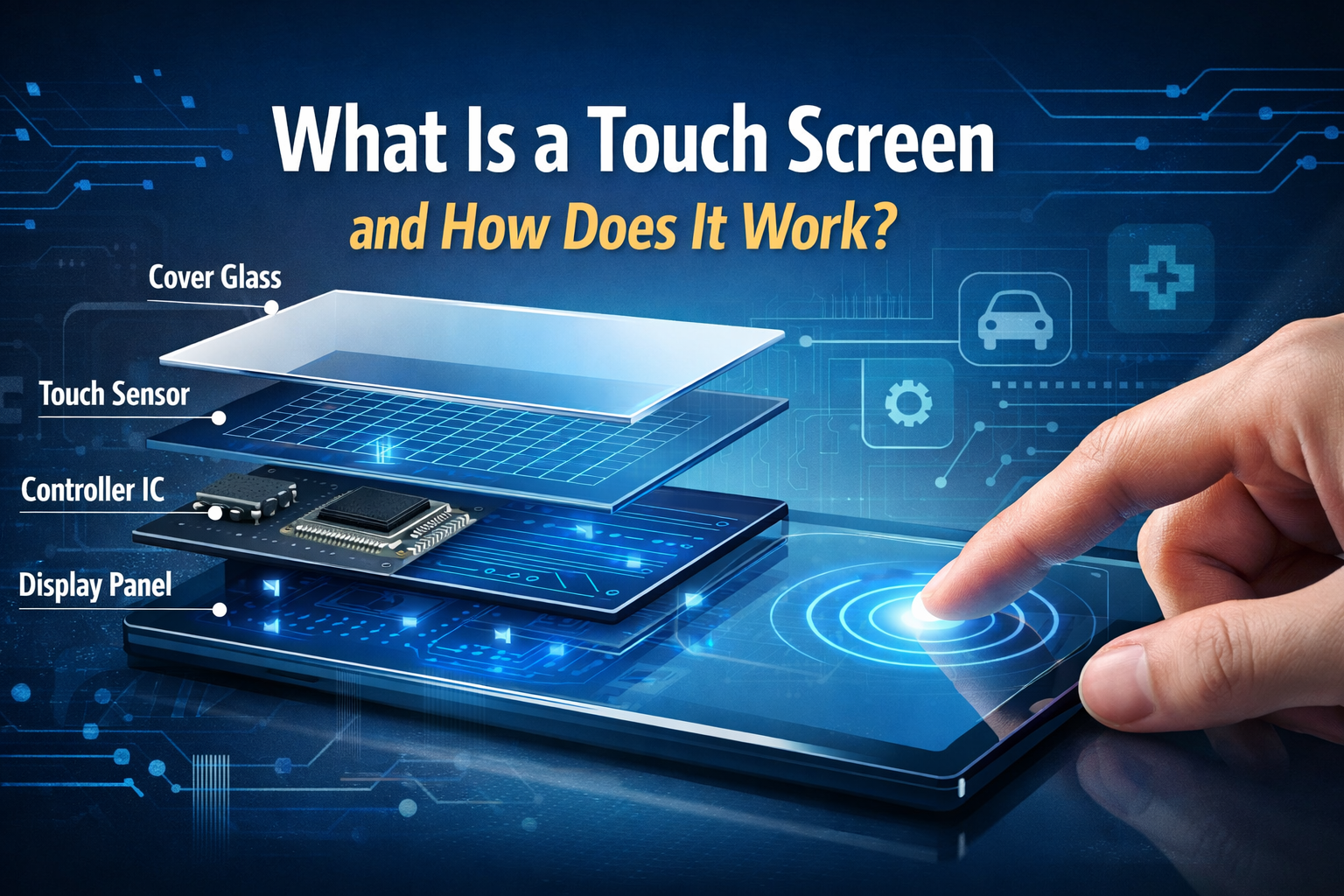
Although designs vary, most touch screens share a similar structure:
Cover Lens
The top protective layer, usually made of glass or plastic. It protects the sensor and provides the surface that users touch.
Touch Sensor
A transparent sensing layer that detects touch input. It typically uses ITO (Indium Tin Oxide) patterns to sense electrical changes or pressure.
Controller IC
The controller processes raw signals from the sensor and converts them into precise touch coordinates.
Interface to the System
The processed data is sent to the main system through interfaces such as I²C or USB.
Each layer plays a specific role, and changes in material or design can affect sensitivity, durability, and reliability.
How Does a Touch Screen Work?
At a basic level, a touch screen works by detecting a physical interaction on its surface and converting that interaction into electrical signals.
When a touch occurs, the sensor detects a change—either in pressure or in electrical characteristics. The controller IC then analyzes these signals, calculates the touch position, and sends the coordinate data to the host system. The operating system or application uses this data to trigger a response, such as pressing a button or moving a cursor.
The exact detection method depends on the type of touch technology used.
Resistive Touch Screen Working Principle
A resistive touch screen consists of two thin conductive layers separated by a small gap. When pressure is applied to the surface, the two layers make contact.
This contact creates a change in electrical resistance at the touch point. The controller measures this change and calculates the X and Y coordinates.
Because resistive touch screens respond to pressure, they can be operated with fingers, gloves, or styluses. This makes them suitable for industrial environments where users may wear protective gear. However, they typically support single-touch operation and have lower optical clarity compared to capacitive types.
Capacitive Touch Screen Working Principle
Capacitive touch screens work by detecting changes in an electrostatic field. A transparent conductive layer is placed on the glass surface and charged with a small electrical current.
When a finger or another conductive object touches the surface, it changes the local capacitance. The controller senses this change and determines the touch location. In projected capacitive (PCAP) designs, multiple sensing points allow the system to detect more than one touch at the same time.
Capacitive touch screens offer higher sensitivity, better optical performance, and support for multi-touch gestures. However, they usually require conductive input and may need tuning to work reliably with gloves or in wet conditions.
Difference Between Touch Screen and Display Panel
A common misunderstanding is treating the touch screen and the display panel as a single component. In reality, they are two independent systems.
The display panel controls brightness, resolution, contrast, and viewing angle. The touch screen controls input accuracy, responsiveness, and environmental tolerance. Problems related to touch performance cannot be solved by changing the display panel alone.
From a system design perspective, both parts must be evaluated separately to ensure compatibility and stable operation.
Where Are Touch Screens Commonly Used?
Touch screens are used across many industries, but requirements differ by application:
Industrial equipment often requires glove operation, resistance to water or oil, and stable performance under electrical noise.
Automotive systems focus on vibration resistance, temperature stability, and reliable operation in sunlight.
Medical devices require smooth surfaces, easy cleaning, and consistent accuracy.
Understanding the working principle is the first step toward choosing the right touch solution for each application.

