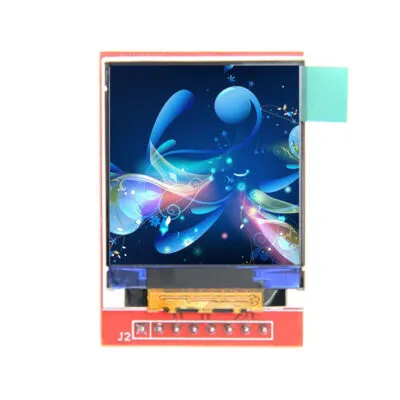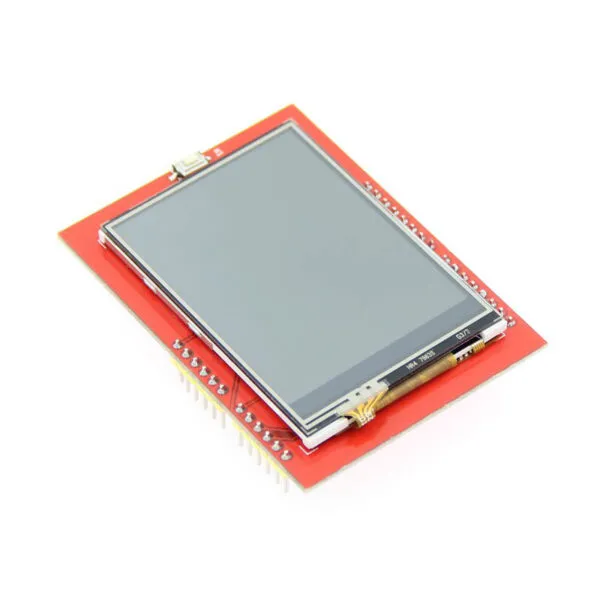

1.44" LCD Arduino Module with SPI Interface & SD Slot - 128x128, 65K Color

SKU: DS20204
Size:

Resolution:

Interface:

Touchscreen Support:

Board Support

Raspberry Pi

abc

1.44-inch IPS TFT module with 16-bit RGB, 128x128 resolution, 4-wire SPI interface & SD card slot. Ideal for embedded systems. Operates at -20°C~60°C.

Request Volume Pricing


    Description

    1.44" LCD Arduino Module with SPI Interface & SD Slot:

    ✅ 1.44" IPS panel with 65K true-color depth
    ✅ Ultra-low latency SPI control
    ✅ Built-in SD card slot enables seamless data storage expansion, supporting firmware updates, image libraries, or log recording.
    ✅ Wide temperature range & anti-glare coating
    ✅ Compact PCB size: 31.49mm x 43.95mm
    LCD Arduino Module


    1.44 inch Arduino SPI Module
    Key Parameters Display Color 16BIT RGB 65K color Interface PIN NO. SYMBOL DESCRIPTION
    Screen Size 1.44(inch) 1 VCC LCD Power positive (3.3V~5V)
    Type TFT 2 GND LCD Power ground
    Driver IC ST7735S 3 GND LCD Power ground
    Resolution 128*128 (Pixel) 4 NC Not defined, reserved
    Module Interface 4-wire SPI interface 5 NC Not defined, reserved
    Active Area (AA area) 26.2x27.2 (mm) 6 LED Backlight control, high level lighting,
    if not controlled, connect 3.3V always bright
    Module PCB Size 31.49x43.95 (mm) 7 CLK LCD SPI bus clock signal
    Operating Temperature -20℃~60℃ 8 SDI LCD SPI bus write data signal
    Storage Temperature -30℃~70℃ 9 RS LCD register / data selection signal,
    high level: register, low level: data
    VCC power voltage 5V/3.3V 10 RST LCD reset signal, low level reset
    11 CS LCD chip select signal, low level enable

    Download

    DS20204 FAQ

    Can I show my intended UI on DS20204 without clipping or running out of memory?

    Try your smallest text, longest labels and icons on a 128 × 128 canvas before committing to the enclosure. Calculate framebuffer memory for your selected pixel format and buffering strategy, then measure the update time with the intended microcontroller.

    How do I tell whether my existing library can drive DS20204?

    For the listed SPI interface, check the exact controller, SPI mode, logic levels and update time with a representative screen. Check that the library names the exact display controller and supports its initialization, addressing and orientation. Test a full-screen pattern before porting the UI.

    Should I choose DS20204 or a module that uses a different display bus?

    Compare pin availability, logic levels, code support and measured full-screen update time with your existing host. For the listed LCD, compare viewing-angle shifts and dark-screen appearance through the front cover. Include the space needed for the connector and any adapter.

    What should I run on a sample of DS20204 before freezing my firmware?

    Test a power cycle, repeated wake, display rotation and the longest update with the other peripherals running. Use the 1.44-inch diagonal to shortlist modules, then check the exact drawing for fit. Check the mounted connector and cable for strain.

    What should a repeat order of DS20204 match to keep my firmware working?

    Use the full module part number and revision from the unit label and the corresponding drawing. Include the controller identifier, bus variant, connector, approved initialization settings and sample revision on the purchase specification.

    Additional information

    Size:

    Resolution:

    Interface:

    Touchscreen Support:

    Board Support

    Raspberry Pi

    Custom Display Solutions

    Work with our engineering experts to create the perfect display for your application. 

    Copyright © 2025 Displaysell.com. All Rights Reserved.

    Site Map

    Privacy Policy

    Terms Conditions